
Top FPV Drone Training Simulator Options for Mastering Flight Control
2026-08-15
Crashing a real FPV drone isn't just expensive—it can ground you for days. That's why serious pilots spend hours in simulators before ever touching the sticks. But with dozens of training options flooding the market, finding the right one can feel like a blind dive. From physics engines that mimic real thrust-to-weight ratios to multiplayer race formats that sharpen your reflexes, the best simulators do more than let you fly—they rewire your muscle memory. At SRIZFLY, we've tested the leading contenders to help you skip the trial-and-error and get straight to mastering flight control. Whether you're prepping for your first acro session or chasing race-day consistency, this roundup cuts through the noise.
Why Your First FPV Simulator Should Feel a Little Too Hard
Most people blame the software when their first FPV simulator session ends in a dizzying crash reel. That frustration is actually a feature. A sim that lets you hover effortlessly on day one is hiding the real workload of throttle management, yaw drift, and stick tension. When the default settings feel slightly unfair, you are forced to read the quad's attitude instead of relying on auto-level crutches.
The awkward period of overcorrecting and losing altitude teaches you something a gentle sim never will: tiny input changes matter. Forgiving physics allow you to slam the sticks and still recover, which builds muscle memory for panic moves. A stiffer, less stable model makes each correction deliberate. You start to feel the weight of the quad and predict its momentum rather than reacting after the fact.
Think of it like learning to drive in a car with heavy steering. It is annoying at first, but when you later switch to the real drone—or a smoother simulator—the controls feel light and responsive. That extra difficulty in the beginning buys you a margin of control that shows up the moment you rip through a tight gap or catch a prop wash wobble at low altitude.
Velocidrone, Liftoff, or DRL? Matching Physics to Your Flying Style
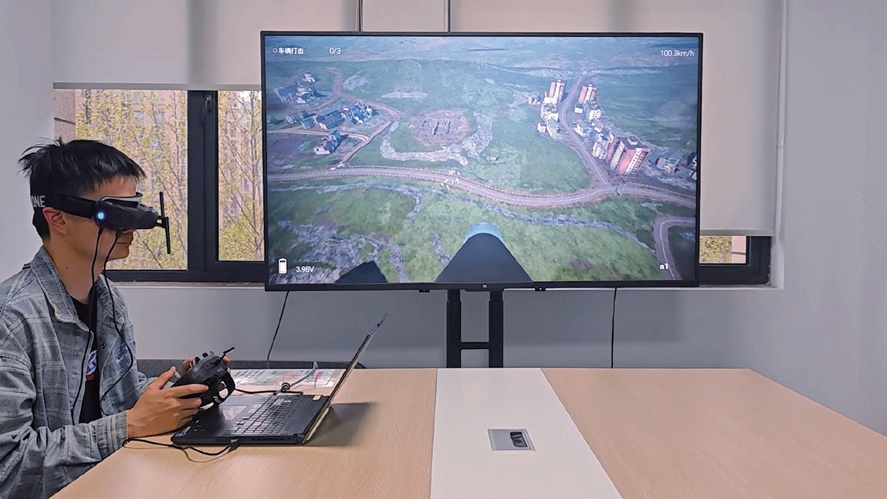
If you spend most of your time chasing lap times and tweaking PIDs, Velocidrone feels like the closest thing to a race-day quad. Its gravity, drag, and prop wash modeling punish sloppy throttle control in a way that Liftoff rarely does. You’ll notice it most in sharp hairpins and split-S exits where momentum matters more than raw stick speed.
Liftoff leans into freestyle and cinematic flying instead. The physics are softer on yaw authority and more forgiving when you’re floating through a gap or reversing a power loop. DRL sits somewhere in between, but with a heavier, locked-in feel that suits big-air tracks and wide-open gates rather than tight backyard courses.
Match the sim to how you actually fly. If you practice for MultiGP or local races, start with Velocidrone. If you’re building a freestyle reel or just want to rip without constant tuning, Liftoff is the smoother pick. And if you like the idea of racing on massive official circuits with a slightly arcade edge, DRL’s physics will feel right at home.
Acro Mode Without the Crash Costs: What to Practice First
Before you ever arm in acro mode, spend a few hours in a simulator with rates set close to your real quad. The goal isn't to nail flips or gaps; it's to burn in the muscle memory of constant, tiny corrections. Hovering in acro feels like balancing a marble on a sheet of glass at first. Don't chase the quad—give it small, steady inputs and let it drift a little. The moment you overcorrect, the wobble amplifies, and that's where most first crashes happen.
The first skill worth mastering isn't forward flight—it's a controlled hover at eye level. Once you can hold a one-meter box for ten seconds without drifting, switch to slow yaw turns. Many pilots skip this and jump straight to forward movement, then lose orientation when the nose swings around. Practice slow left and right yaw while holding altitude, then add a gentle forward nudge and stop. That stop is critical: you need to feel how the quad pitches back to bleed speed without climbing.
Finally, practice throttle control in a straight line before you touch any flips or rolls. Set a long, empty field and fly back and forth at constant height. The biggest hidden cost in acro isn't the trick itself—it's the recovery. Learn to bail out smoothly by leveling the horizon and adding a touch of throttle, not by slamming the sticks. If you can end every maneuver with a stable hover, you'll spend far less on props and arms.
Customizing Rates and PIDs in a Virtual Hangar
Tweaking rates and PIDs inside a virtual hangar often feels less like tuning and more like coaxing a stubborn aircraft into cooperating. You start by nudging the rate profiles until the model stops overshooting in sharp turns, then move to the PID loop where a half-point adjustment on the D term can turn a wild oscillation into a locked-in hover. The virtual environment lets you test aggressive changes without risking a real airframe, which is why so many pilots treat it as a sandbox for discovering how far the control loop can be pushed before it fights back.
One trick that rarely makes the manuals is to duplicate a known-good PID set and then break exactly one axis at a time. Drop the P on roll just enough to feel sloppy, then watch how the simulated gyro struggles to correct. That contrast teaches more than any default tune. From there, adding a custom rate curve with a softer center and a sharp edge at full stick travel can mimic the feel of a much larger aircraft, making the virtual hangar an ideal place to prototype setups for models you haven't even built yet.
Eventually the process becomes intuitive: you'll hear the difference in the simulated motor noise before the graphs confirm it. A slightly high I term on yaw produces that telltale slow wag, while a low D lets the tail drift after quick inputs. Saving multiple named profiles for different weather or payload conditions turns the hangar into a living library of flight characteristics, ready to be loaded into the real transmitter once the virtual tests feel right.
Turning Replay Tools into Rapid Skill Progression
Most players treat replays as a post-match autopsy, but that's a slow way to learn. Instead, flip the script: use replay tools as an active training loop. Before your next session, pick one specific mechanic—say, wave management in a MOBA or recoil control in a shooter—and watch only that segment at 0.5x speed. Jot down the exact timing of your inputs, then immediately recreate the scenario in a custom match or practice range. The key is not to analyze, but to iterate within minutes of watching.
A practical trick is to set a replay bookmark hotkey and mark every death or failed engagement as it happens. After three games, load the bookmarks and sort them by frequency. You'll quickly spot a pattern: maybe you always overextend after a successful trade, or your crosshair drifts upward during long sprays. Rather than fixing everything at once, isolate the most frequent mistake and spend fifteen minutes drilling a counter-move. Repeat this cycle daily, and you'll compress weeks of passive review into days of measurable progress.
Finally, use replay tools to steal from opponents instead of just critiquing yourself. When an enemy outplays you, clip their perspective and break down their decision tree in under sixty seconds. What did they scout? When did they commit? How did they retreat? Then run a mirror drill: recreate that same scenario from their side in a bot match until you can execute the play against live opponents. This turns every loss into a free coaching session, and before long your improvement will feel less like grinding and more like a rapid skill transfer.
From Sim Gates to Real Gates: Building Race Lines That Stick
Simulators give you a safe place to chase tenths, but the line that works on a screen rarely survives contact with a real track. Grip changes with temperature, surface wear, and rubber buildup, which means the perfect apex from last night's session might send you wide by Sunday morning. Good drivers treat the sim line as a starting point, not a rulebook.
When you finally roll through the real gates, your eyes need to read the asphalt, not the dashboard. Look for dark rubber trails, patches of aggregate, and the subtle camber shifts that never show up in a sim's simplified model. The line that sticks is the one you build lap after lap, adjusting your turn-in point by a tire's width, learning where the rear will slide and where it will bite.
Consistency beats outright speed because a race line only matters if you can hit it every lap while managing traffic and tire degradation. Start with the sim's geometry, then let the real surface teach you how much of it to keep. By the time the checkered flag drops, you won't be driving a virtual line anymore — you'll be carving a groove that belongs to you and the track alone.
FAQ
Focus on realistic physics, adjustable rates, and a variety of environments. Some sims excel at freestyle, others at racing, so match the software to your goals. Also check controller compatibility and whether the developer updates regularly.
VelociDrone is often recommended because it has a gentle learning curve with tutorials and a huge selection of maps. Liftoff is also beginner-friendly but leans more toward freestyle. Try both through their free demos if available.
No, but it gets you about 80% of the muscle memory for basic control. Real drones have wind, prop wash, and inertia differences. Use a sim to drill stick movements, then transition to a tiny whoop or micro quad outdoors.
Most cost between $20 and $50. Liftoff is around $20, VelociDrone around $25, and the DRL Simulator is free on Epic Games occasionally. You also need a compatible radio transmitter, which you likely already own if you fly.
Yes, the DRL Simulator is free on some platforms and offers solid physics. There's also FPV.SkyDive, an open-source option that's completely free. They lack some polish but are perfect for testing whether you enjoy the hobby.
Racing sims like VelociDrone or DRL emphasize precise gate timing, tighter physics, and leaderboard integration. Freestyle sims like Liftoff or Uncrashed give you big open maps, soft obstacles, and more forgiving collision settings to encourage trick learning.
Yes, especially for learning new tricks without breaking parts. You can repeat a power loop or Matty flip hundreds of times in an hour, which would cost a fortune in real crashes. Pros use sims to stay sharp in bad weather too.
Many pilots point to Tryp FPV for its graphics and realistic flight feel, while VelociDrone is praised for its physics accuracy. Uncrashed is also gaining ground with detailed maps. Realism is subjective, so try demos and see which one matches your quad's behavior.
Conclusion
You won't really know what a quad can do until you crash it a few hundred times in a place where the reset button costs nothing. The best FPV simulators lean into that discomfort: they make your first acro sessions feel slightly beyond your control, because that's exactly where your muscle memory needs to grow. Velocidrone's floaty, momentum-heavy physics push you toward smooth, wide arcs, while Liftoff's tighter, more direct response rewards snappy corrections, and DRL's slightly exaggerated drag can make tight courses feel more forgiving. Rather than hunting for the "most realistic" option, pick the one that punishes your current bad habits the most. Spend your first hours in acro mode only—no angle assist, no horizon rescue—and drill the three moves that cause the most real-world damage: coordinated turns, altitude-holding rolls, and recovery from an unexpected yaw spin. It will feel too hard. That's the point.
Once you can hold a rough line without panicking, move into the virtual hangar and start treating rates and PIDs as your primary tuning tools, not afterthoughts. Lower your rates to around 500–600 deg/s for more resolution on small stick movements, then gradually raise them only when your corner entries stop overshooting. Replay tools are where the fastest gains hide: record a tight gate sequence, watch it from the drone's rear view, and compare your stick trace against the track's ideal arc. Most pilots skip this because it feels slower than just flying again. Don't. Finally, when you build a race line in the simulator, force yourself to fly it with both a lightweight 3-inch and a heavy 5-inch build—if the same line works for both, it's a line that will transfer to real gates, not just sim gates.
Contact Us
Contact Person: Niles Liu
Email: [email protected]
Tel/WhatsApp: 8619945009803
Website: https://srizfly.com/